
Developer Guide
RepairOps provides a REST API and a plugin system for developers and integrators. Read and create core records, subscribe to webhooks, extend the platform with marketplace plugins, and — for Enterprise customers — run RepairOps on your own infrastructure.
Core Developer Topics
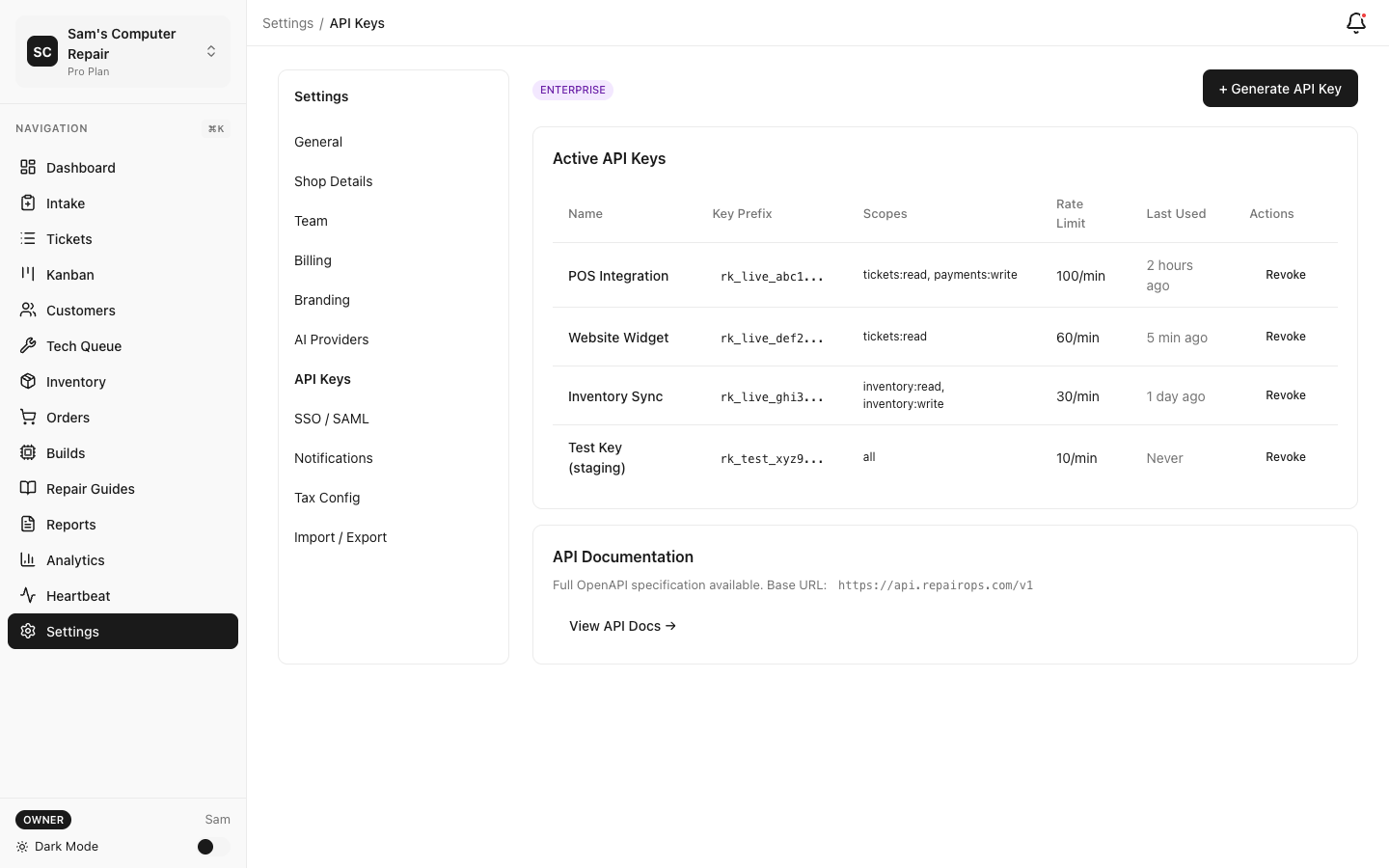
Section titled “Core Developer Topics”Read and create tickets, customers, and devices, look up inventory, pull KPI/usage data, manage outbound webhooks, and submit plugins. Manage API keys in Settings → API Keys.
Available on: Business and Enterprise tiers.
Build custom plugins that declare capabilities (email, SMS, payments, AI, voice, and more) and
submit them to the marketplace for review. Capability types and the manifest schema live in
@repairops/plugin-sdk.
Available on: Marketplace install requires Pro and above.
Run the full RepairOps stack — web, worker, self-hosted Supabase, and Caddy — with Docker Compose.
Available on: Enterprise / self-hosted packages.
API Quickstart
Section titled “API Quickstart”Get started with the REST API in 3 steps:
1. Generate an API Key
Section titled “1. Generate an API Key”Settings → API Keys → Generate New Key (organization OWNER only). Choose a scope —
read, write, or admin (scopes are hierarchical). Copy the key (ro_live_...) immediately; it
is shown only once.
2. Make an API Call
Section titled “2. Make an API Call”curl -H "Authorization: Bearer ro_live_YOUR_API_KEY" \ https://app.repairops.app/api/v1/tickets3. Read the API Reference
Section titled “3. Read the API Reference”See the REST API Reference for every endpoint, the response envelope, error codes, pagination, and the webhook system.
Plugin Quickstart
Section titled “Plugin Quickstart”Plugins are TypeScript packages described by a manifest.json. The capability types and manifest
schema are exported from @repairops/plugin-sdk. A minimal manifest:
{ "id": "com.example.my-plugin", "name": "My First Plugin", "version": "1.0.0", "vendor": "Your Company", "description": "A simple RepairOps plugin", "capabilities": ["send_email"]}Submit a packaged plugin for review with an admin-scoped API key:
curl -X POST "https://app.repairops.app/api/v1/plugins/submit" \ -H "Authorization: Bearer ro_live_YOUR_API_KEY" \ -H "Content-Type: application/json" \ -d '{ "manifest": { ... }, "bundle_url": "https://example.com/my-plugin.zip" }'See the Plugin SDK for the full manifest spec, the complete capability list, and the submission/install flow.
Self-Hosted Quickstart
Section titled “Self-Hosted Quickstart”The self-hosted stack ships as a Docker Compose project (web + worker + self-hosted Supabase
services + Caddy reverse proxy). After provisioning your .env (Postgres password, JWT/anon/
service-role keys, REPAIROPS_DATA_KEY_B64, SITE_URL):
docker compose up -dSee Self-Hosted Deployment for the full service list, environment reference, and bootstrap order.
Common Integration Patterns
Section titled “Common Integration Patterns”React to Ticket Events
Section titled “React to Ticket Events”Register a webhook endpoint (admin scope) and subscribe to ticket.* events. Each delivery is
signed with HMAC-SHA256 in X-RepairOps-Signature:
{ "id": "delivery-uuid", "event": "ticket.transitioned", "timestamp": "2026-06-12T15:30:00Z", "data": { "id": "ticket-uuid", "ticket_code": "T-001234", "status": "IN_REPAIR", "previous_status": "APPROVED" }}Export Tickets for Analysis
Section titled “Export Tickets for Analysis”curl -H "Authorization: Bearer ro_live_YOUR_API_KEY" \ "https://app.repairops.app/api/v1/tickets?per_page=100&page=1"Create Repair Tickets Programmatically
Section titled “Create Repair Tickets Programmatically”Tickets require existing customer_id and device_id records — create the customer and device
first, then the ticket:
curl -X POST \ -H "Authorization: Bearer ro_live_YOUR_API_KEY" \ -H "Content-Type: application/json" \ -d '{ "shop_id": "shop-uuid", "customer_id": "customer-uuid", "device_id": "device-uuid", "issue_description": "Cracked screen" }' \ https://app.repairops.app/api/v1/ticketsAuthentication
Section titled “Authentication”All API requests use bearer API key authentication:
Authorization: Bearer ro_live_YOUR_API_KEYKeys are created and revoked in Settings → API Keys (OWNER only). Only a hash of the key is stored; the plaintext is shown once.
Rate Limits
Section titled “Rate Limits”Rate limits are enforced per API key on a sliding 60-second window:
- 100 requests / minute by default (Enterprise keys: 1,000 / minute).
- Exceeding the limit returns
429 RATE_LIMITEDwith aRetry-After: 60header.
Separately, each request consumes one unit of the monthly api_calls meter (Business 50,000 /
Enterprise 500,000); exhausting it returns 402.
Architecture Overview
Section titled “Architecture Overview”┌──────────────────────────────────────┐│ Your Application ││ (Website, Kiosk, CRM, etc.) │└─────────────┬────────────────────────┘ │ REST API (Bearer ro_live_…) │┌─────────────v────────────────────────┐│ RepairOps API (Next.js /api/v1) ││ - API-key auth + scope checks ││ - Tier gate (Business+) ││ - Metering + per-key rate limiting ││ - Tenant scoping by org_id │└─────────────┬────────────────────────┘ │┌─────────────v────────────────────────┐│ RepairOps Backend ││ - Ticket state machine ││ - Outbox + webhook delivery worker ││ - Multi-tenant isolation (RLS) │└─────────────┬────────────────────────┘ │┌─────────────v────────────────────────┐│ Postgres (Supabase) ││ - Tickets, customers, inventory ││ - Row-level security │└──────────────────────────────────────┘Data Model Overview
Section titled “Data Model Overview”Core Entities
Section titled “Core Entities”- Organizations — your tenant
- Shops — physical locations
- Customers — customer profiles
- Devices — customer-owned devices brought in for repair
- Tickets — repair work orders
- Inventory — parts and materials
- Invoices — billing records
Relationships
Section titled “Relationships”Organization├── Shops│ ├── Tickets ──► Customer, Device, Technician (User), Invoices│ └── Inventory└── Team Members (Users)Tier Requirements
Section titled “Tier Requirements”| Feature | Starter | Pro | Business | Enterprise |
|---|---|---|---|---|
| REST API + API keys | — | — | ✓ | ✓ |
| Outbound webhooks | — | — | ✓ | ✓ |
| Plugin marketplace | — | ✓ | ✓ | ✓ |
| Self-hosted deployment | — | — | Optional package | ✓ |
Getting Help
Section titled “Getting Help”- Documentation: docs.repairops.app
- Source / issues: github.com/SamEscapeToVR/repair-ops-saas
Ready to integrate? Start with the REST API Reference or the Plugin SDK.