
iFixit Repair Guides
Integrate iFixit’s library of 70,000+ repair guides directly into RepairOps. Search for step-by-step repair procedures, attach guides to tickets, and let AI recommend relevant guides automatically.
Available on: Pro and Enterprise tiers (requires commercial iFixit license).
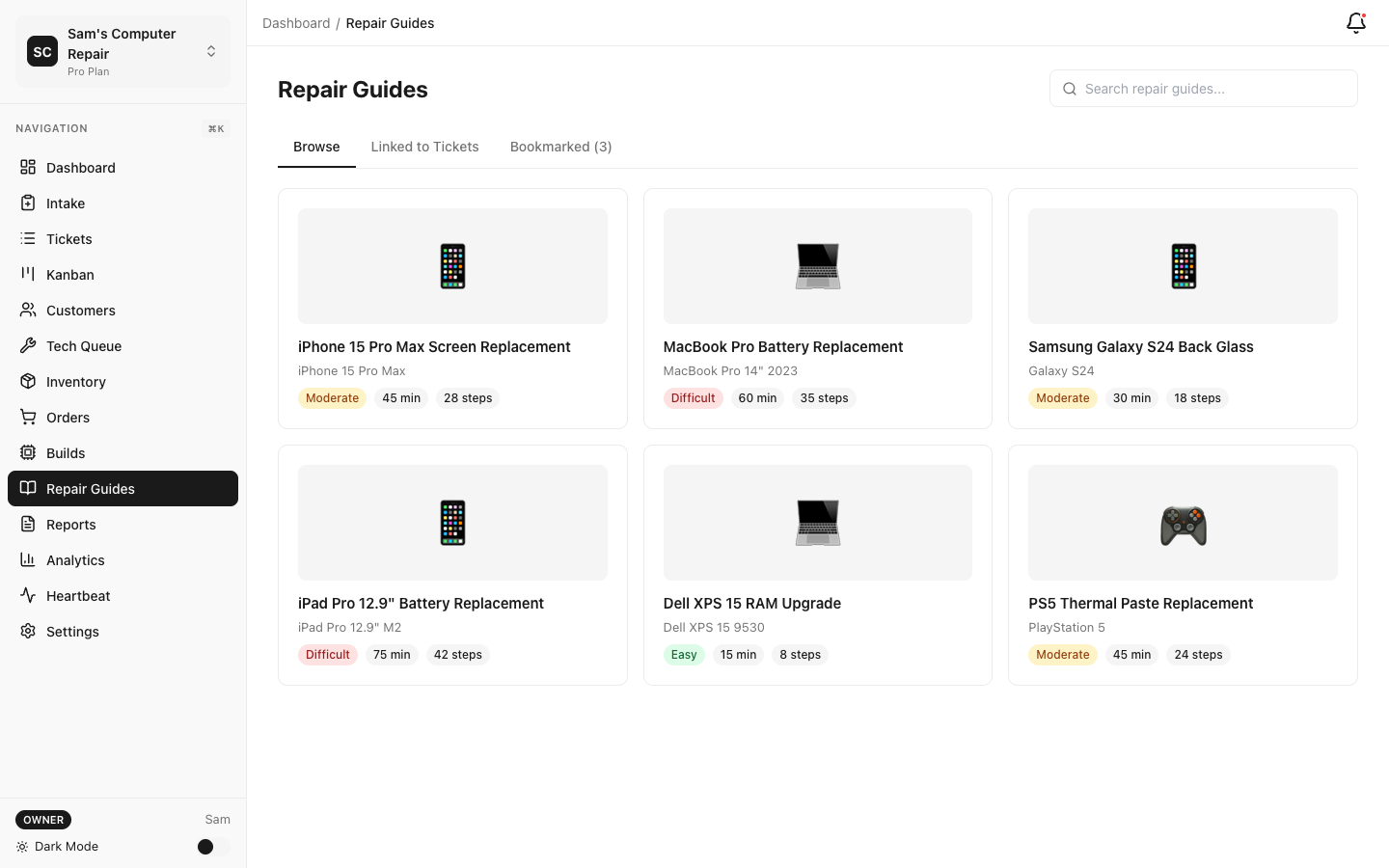
Accessing iFixit Guides
Section titled “Accessing iFixit Guides”Search Interface
Section titled “Search Interface”- Navigate to Guides → iFixit Repair Library
- Search by:
- Device name (e.g., “iPhone 14 Pro”, “MacBook M1”)
- Category (e.g., Phones, Computers, Tablets, Game Consoles)
- Repair type (e.g., Battery replacement, Screen repair)
- Browse results sorted by:
- Relevance (default)
- Difficulty level
- Time estimate
- Popularity (most-viewed)
Guide Details
Section titled “Guide Details”Click a guide to view:
- Title and overview — Brief description of what the guide covers
- Difficulty level — Easy, Medium, Hard, Very Hard
- Time estimate — Typical duration (e.g., 45 minutes)
- Tools required — What tools you need
- Parts required — Replacement parts (if applicable)
- Step-by-step instructions — Photo-guided steps with numbered procedures
- Warnings — Safety alerts (e.g., “Contains sharp edges”, “Uses adhesive”)
- Related guides — Similar or follow-up repairs
Attaching Guides to Tickets
Section titled “Attaching Guides to Tickets”Adding a Guide to a Ticket
Section titled “Adding a Guide to a Ticket”- Open a ticket in any status
- Click Attachments → Attach iFixit Guide
- Search for the guide by device or repair type
- Click Attach
- Guide appears in ticket attachments for the entire team to reference
When to attach:
- Technician is unsure about a repair procedure
- Device model has a complex disassembly
- New technician needs step-by-step guidance
- For QC — verify repair was done per iFixit procedures
Viewing Attached Guides
Section titled “Viewing Attached Guides”Team members can:
- Click the guide link in ticket attachments
- View full guide (photos, steps, warnings)
- Mark steps as complete (if integrating with work log)
- Return to ticket
Guides open in a side panel so you don’t lose your place in the ticket.
AI-Powered Guide Recommendations
Section titled “AI-Powered Guide Recommendations”When KB Chat is enabled with an AI add-on or Enterprise AI:
Automatic Suggestions
Section titled “Automatic Suggestions”As you document repair work in the ticket:
- Write diagnostics findings or repair steps
- AI analyzes the issue and device type
- Automatically suggests relevant iFixit guides
- Suggestions appear as cards: “Did you find this helpful?”
Example:
- Tech writes: “Water damage, trying to clean components”
- AI suggests: “iPhone 14 Pro: Water Damage Repair” guide
- Tech clicks to view step-by-step procedure
Manual Guide Lookup
Section titled “Manual Guide Lookup”- Click Suggest Guides in the ticket
- AI searches iFixit library for device + issue
- Shows top 5 most relevant guides with relevance score
- Click Attach on any guide
Caching for Fast Access
Section titled “Caching for Fast Access”iFixit guides are cached locally in RepairOps:
Benefits:
- Guides load instantly (no external API call needed)
- Offline access (if internet is down, cached guides still available)
- Faster searching
- Reduced load on iFixit servers
Cache refresh:
- Automatic weekly sync (every Sunday at 2 AM)
- Manual sync available: Settings → Plugins → iFixit → Sync Now
- Cache is shop-scoped (each shop has its own local copy)
What’s cached:
- Full guide content (text, photos, video)
- Search index (for fast full-text search)
- Metadata (difficulty, time, tools required)
Integration with KB Chat
Section titled “Integration with KB Chat”iFixit guides complement your internal Knowledge Base:
How They Work Together
Section titled “How They Work Together”- Internal KB — Your shop’s procedures, policies, device-specific lessons learned
- iFixit guides — Manufacturer repair procedures, step-by-step official instructions
When a technician asks KB Chat a question:
- Chat searches your internal KB first
- If relevant guide found in KB, returns it
- Also suggests relevant iFixit guides
- Technician can see both perspectives
Example:
- Question: “How do I replace a MacBook battery?”
- KB Chat returns:
- Your internal article: “MacBook battery safety tips” (your shop’s experience)
- iFixit guide: “MacBook Pro 16-inch: Battery Replacement” (official procedure)
Configuration
Section titled “Configuration”License Setup
Section titled “License Setup”To use iFixit guides, you need an iFixit Commercial License:
- Contact iFixit: commercial@ifixit.com
- Obtain commercial license (license key)
- In RepairOps: Settings → Plugins → iFixit
- Paste license key
- Click Authorize
- First sync begins automatically
License covers:
- Up to 1,000 guides per month
- All 70,000+ guides in library
- 2-year commercial license
- Support for embedded guide viewing
Search Settings
Section titled “Search Settings”Customize search behavior:
- Settings → Guides → iFixit Search
- Select preferred device categories:
- Phones, Tablets, Computers, Game Consoles, etc.
- Set difficulty filter:
- Show all difficulties (default)
- Hide very difficult guides (only show Easy/Medium/Hard)
- Show only “Easy” guides (curated for first-timers)
- Set time limit (optional):
- Hide guides > 2 hours duration
- Useful for high-volume shops with time constraints
- Save
Offline Access
Section titled “Offline Access”If your internet goes down, cached guides remain accessible:
- Guides → iFixit Repair Library
- Previously viewed guides are available
- Offline indicator appears in search
- Note: Search may be limited to recently cached guides
Note: New guides can’t be downloaded until internet is restored.
Analytics & Usage
Section titled “Analytics & Usage”Track how often guides are used:
- Analytics → Guides
- View:
- Top 10 most-referenced guides
- Guides by device category
- Guides by repair type
- Growth trend (month-over-month)
Use cases:
- Identify common repair types your shop handles
- Focus training on guides you use most
- Spot skill gaps (guides accessed frequently but with low QC pass rate)
Tier Availability
Section titled “Tier Availability”| Feature | Pro | Enterprise |
|---|---|---|
| Search iFixit library | ✓ | ✓ |
| Attach guides to tickets | ✓ | ✓ |
| View full guides | ✓ | ✓ |
| Local caching | ✓ | ✓ |
| Auto-update weekly | ✓ | ✓ |
| AI-powered recommendations | ✓* | ✓ |
| KB Chat integration | ✓* | ✓ |
| Analytics/usage tracking | ✓ | ✓ |
*Requires an AI add-on or Enterprise AI
Best Practices
Section titled “Best Practices”Attach guides early — If you’re unsure about a procedure, attach the iFixit guide immediately rather than working from memory.
Use for onboarding — New technicians benefit from seeing official procedures. Attach the guide and have them follow along on their first repair.
Compare to internal KB — If your internal KB differs from iFixit procedure, discuss the difference. You may be doing something better, or the iFixit procedure may be safer.
Track guide usage — Monitor the analytics. If a guide is accessed 10 times per month, document why and consider adding context in your internal KB.
Leverage AI suggestions — Let AI recommend guides. They may surface procedures you weren’t thinking of.
Troubleshooting
Section titled “Troubleshooting”Can’t find a guide for my device
- Try searching by parent category (e.g., “iPhone” instead of “iPhone 14 Pro”)
- Try repair type instead of device name
- Check iFixit online (ifixit.com) to confirm guide exists
Guide content looks outdated
- Guides are synced weekly, but iFixit may not have updated their guide
- Report to iFixit directly at support@ifixit.com
- In meantime, use your internal KB as the source of truth
License expired
- Guides stop working
- Contact iFixit to renew license
- Email iFixit your license key to activate renewal
Related Features
Section titled “Related Features”- Knowledge Base — Complement iFixit with internal procedures
- KB Chat — AI integrates iFixit guides into search results
- Analytics — Track guide usage by technician and device